Designing an Enterprise Conditions Management Experience
Creating scalable administrative workflows for managing complex underwriting conditions, governance, and high-volume data.
The Challenge
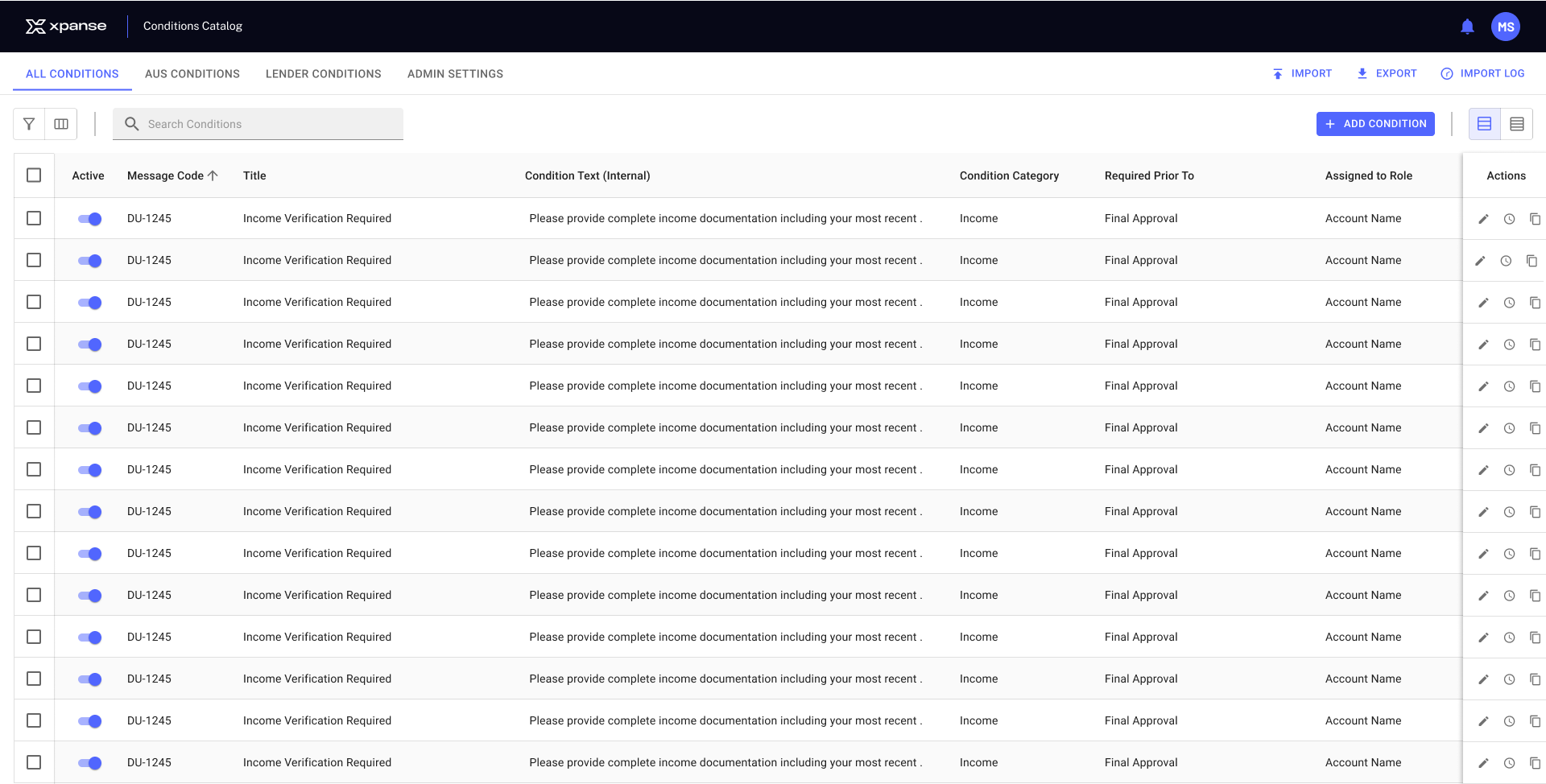
The Conditions Catalog served as the central administration tool for managing underwriting conditions used throughout the loan origination system. As the catalog continued to grow, administrators needed efficient ways to search, organize, edit, import, and govern hundreds of reusable conditions. The challenge was to design an enterprise experience that balanced flexibility, scalability, and speed for users who relied on the application every day.
The Approach
My approach focused on designing for efficiency without sacrificing usability. I partnered with product and engineering to understand how administrators created, organized, maintained, and governed underwriting conditions throughout their lifecycle. Rather than treating the Conditions Catalog as a standalone table, I designed a complete administration experience that supported creating new conditions, editing existing ones, advanced search and filtering, bulk actions, imports and exports, version history, and reusable interaction patterns. Every design decision was made to help power users manage large volumes of data quickly, accurately, and with confidence.
The application intentionally uses two panel behaviors based on user intent. Persistent panels support ongoing interaction with the catalog, while overlay side sheets are reserved for focused, task-oriented workflows. This distinction helped create consistent interaction patterns throughout the application while reducing unnecessary navigation.
Advanced Filtering
Challenge
The Conditions Catalog served as the central administration tool for managing underwriting conditions used throughout the loan origination system. As the catalog continued to grow, administrators needed efficient ways to search, organize, edit, import, and govern hundreds of reusable conditions. The challenge was to design an enterprise experience that balanced flexibility, scalability, and speed for users who relied on the application every day.
Solution
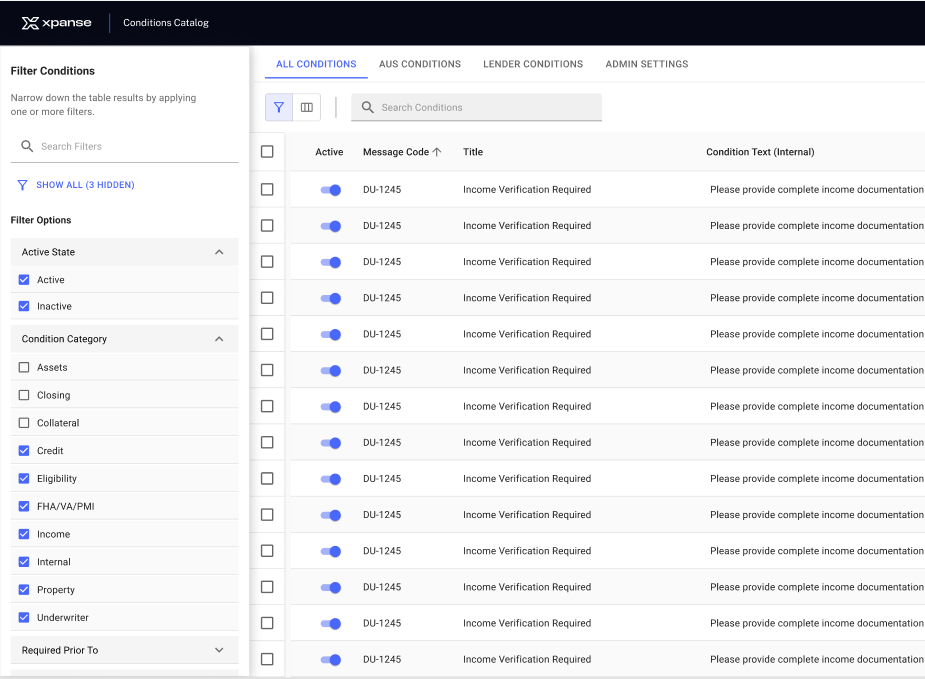
The filtering experience was intentionally designed as a persistent workspace. When users selected the Filter action, the panel opened from the left and shifted the Conditions Catalog rather than overlaying it. This allowed administrators to continuously refine filter criteria while keeping the table visible and immediately seeing the results update. The panel remained open until dismissed, supporting an iterative workflow without interrupting the user's task.
- Organized filters into logical groups based on how administrators think about conditions.
- Used expandable sections to keep the interface compact while allowing quick access to advanced filters.
- Preserved selected filter states so users could refine searches without losing context.
- Designed search and filtering to work together, reducing the time required to locate specific conditions.
- Documented interaction behaviors, default states, and edge cases to ensure consistent implementation.
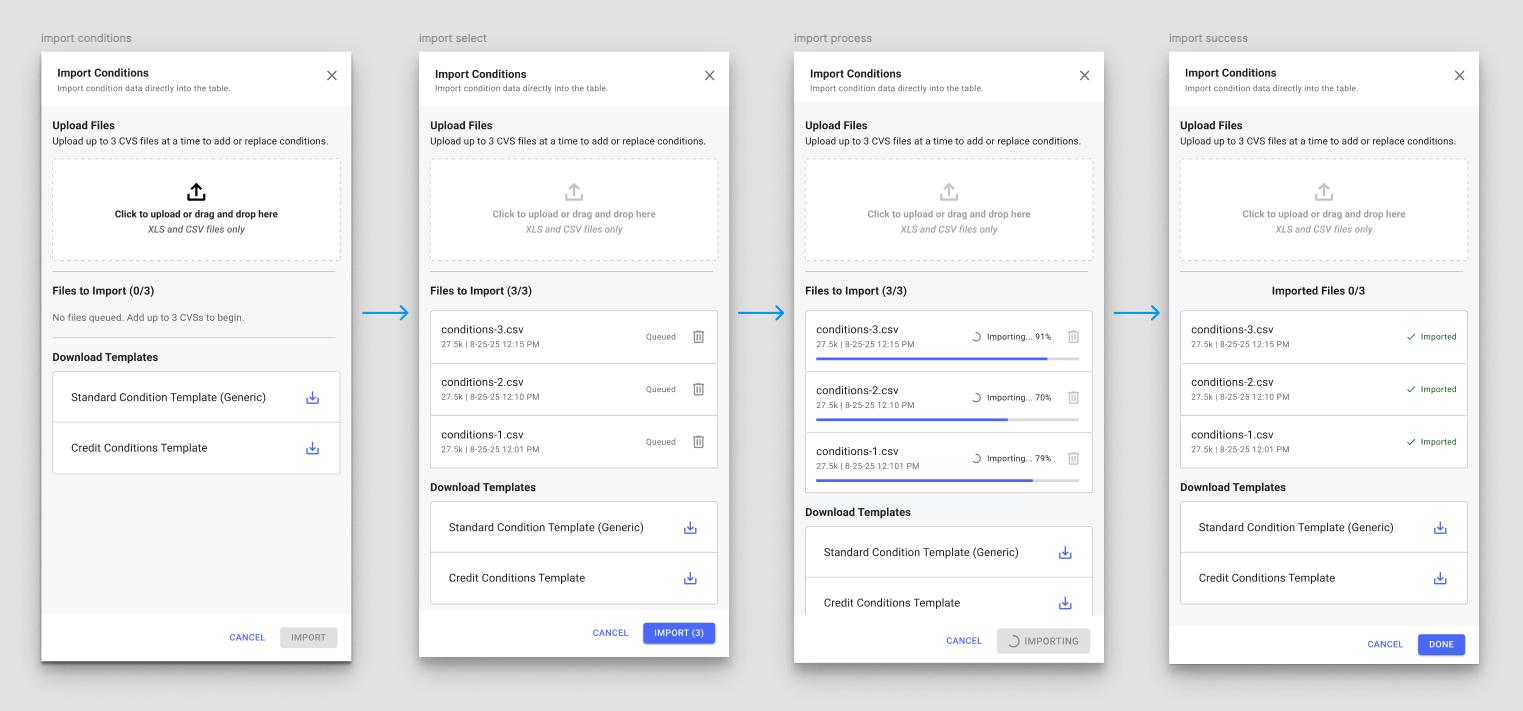
The import workflow guided administrators from file upload through validation, processing, and completion while providing continuous feedback at every stage.
Bulk Import Workflow
Supporting high-volume condition management with guided imports and real-time feedback.
The Challenge
Administrators frequently needed to add or update large numbers of conditions at once. Rather than requiring manual entry, I designed an import workflow that guided users through uploading condition files, validating content, tracking progress, and confirming successful completion. The experience emphasized visibility, error prevention, and confidence throughout the import process.
The Approach
The import workflow used a different interaction pattern. Because importing conditions is a focused, multi-step task, the experience was presented as a right-side overlay. This kept users within the Conditions Catalog while temporarily shifting their attention to the import process. When complete, closing the side sheet returned users directly to the updated catalog.
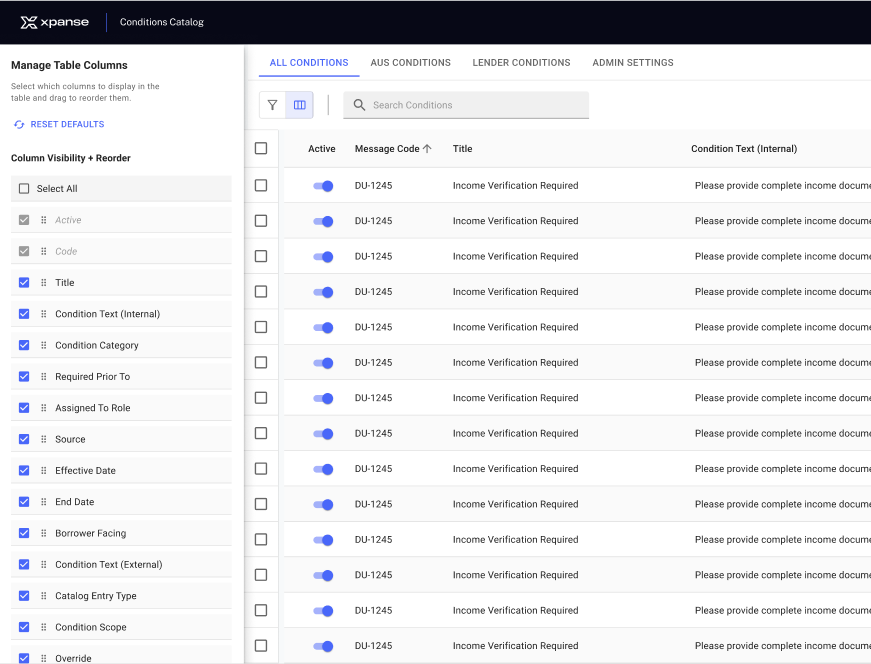
Administrators could customize the Conditions Catalog by selecting visible columns and reordering them while the table remained visible, providing immediate feedback as the layout changed.
Column Management
Challenge
Administrators relied on different information depending on the task they were performing. Displaying every available field at once created unnecessary visual noise, while limiting the table to a fixed set of columns reduced flexibility.
Solution
I designed a customizable column management experience that allowed users to tailor the Conditions Catalog to their workflow. Administrators could choose which columns to display and reorder them based on priority, creating personalized views without leaving the catalog. Like filtering, the panel opened from the left and shifted the table to preserve visibility, allowing users to immediately see the impact of their changes.
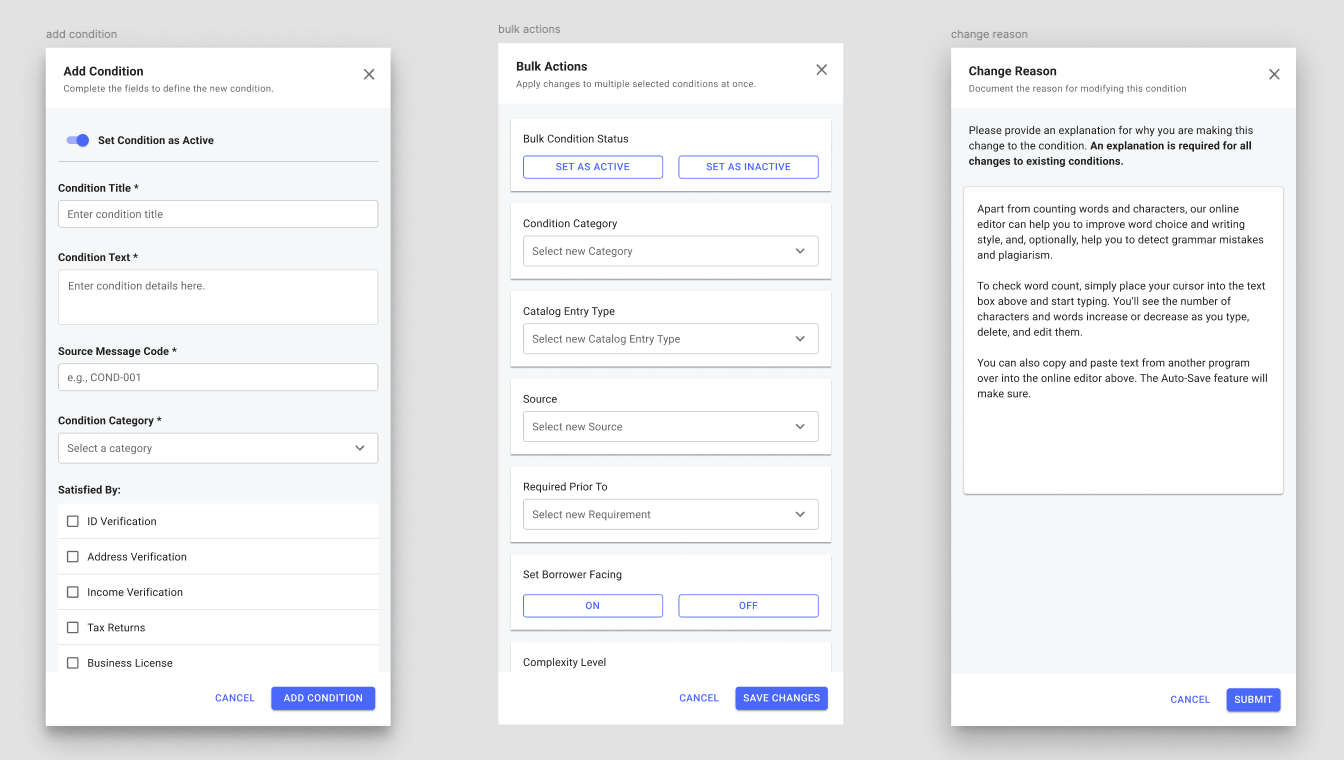
Reusable side-sheet patterns supported condition creation, bulk editing, and governance workflows while allowing administrators to remain within the Conditions Catalog.
Reusable Task Side Sheets
Consistent interaction patterns for focused administrative workflows.
Rather than navigating administrators away from the Conditions Catalog, I designed task-oriented side sheets that allowed users to complete focused workflows while preserving their place in the application. This reusable pattern was applied consistently across condition creation, bulk updates, version history, and change management, reducing context switching while creating a familiar experience throughout the catalog.
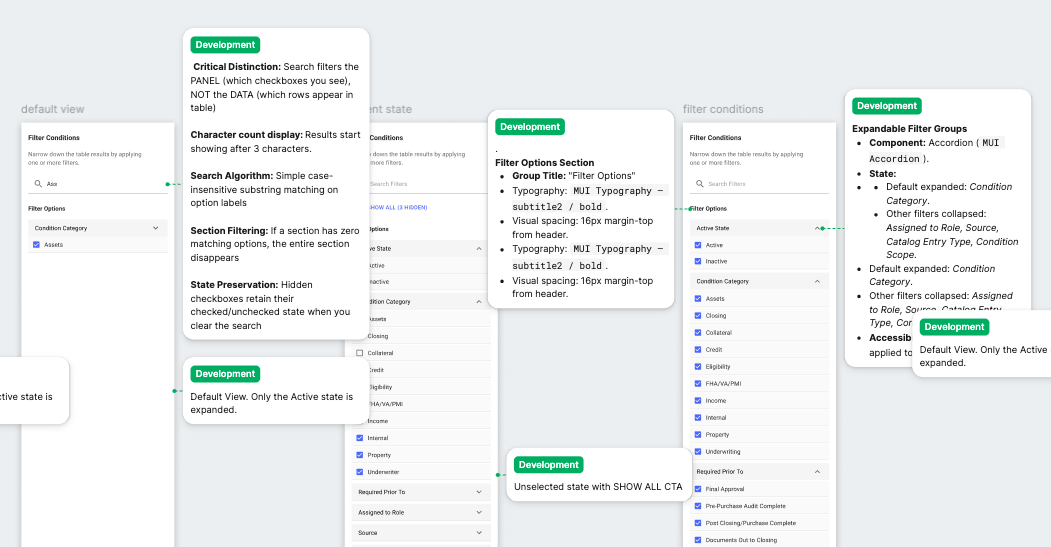
Interaction specifications documented behavior, default states, and edge cases to ensure a consistent implementation across development.
Design Documentation & Developer Handoff
Translating design decisions into implementation-ready specifications.
Designing the interface was only part of the process. Each workflow was documented with detailed interaction specifications to ensure consistent implementation across engineering. Rather than focusing solely on visual design, the documentation captured user interactions, default states, component behavior, validation rules, and edge cases so developers could confidently build the intended experience. These specifications became a shared reference between design and engineering, reducing ambiguity during implementation while preserving design intent throughout development.